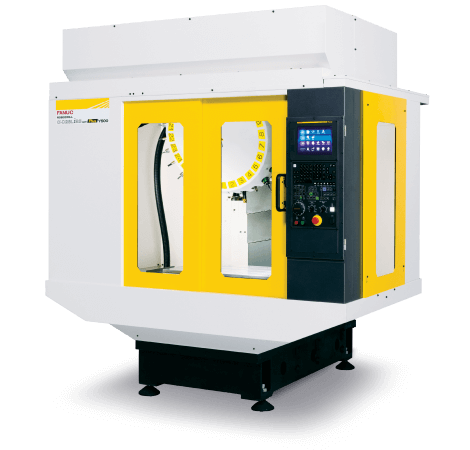
The FANUC CNC simulator provides direct access to the world’s most popular CNC interface in a compact, classroom-ready package. Based on the advanced FANUC Series 0i-MODEL F Plus, this simulator is engineered for effective and safe training. It allows students and new machinists to develop essential skills in CNC programming and operation without needing a full-scale machine tool. The simulator delivers a true-to-life experience, mirroring the exact look, feel, and function of a genuine FANUC control. This hands-on familiarity ensures trainees are well-prepared for real-world manufacturing environments. Its design is specifically focused on making complex CNC concepts accessible and understandable for learners in North America, bridging the gap between theoretical knowledge and practical application in a controlled, educational setting.
Key skills and applications of the FANUC CNC simulator
The primary application of the simulator is to build foundational competency in CNC operations. Its integrated MANUAL GUIDE i interface enables users to master conversational programming, a key skill for efficient machine setup. Students learn to generate programs graphically and visualize the machining process through 3D simulation. This process reinforces their understanding of tool paths and machine movements before the program is ever sent to a physical machine. The simulator also trains users on essential data management functions, such as uploading and downloading programs using modern interfaces like USB and Ethernet. This comprehensive skill set ensures a seamless transition from the classroom to the shop floor, empowering trainees with the confidence and ability to operate industry-standard equipment.
FANUC CNC simulator specifications and features
Feature
Specification
Product dimensions
421mm x 220mm x 608mm (W x D x H)
Product weight
Approx. 12kg
Applicable education levels
High school CTE, vocational training, post-secondary programs
Control platform
FANUC Series 0i-MODEL F Plus
System switchability
Switchable mill and lathe system
Axis capability (milling)
3 axis milling + 1 spindle
Axis capability (turning)
2 axis turning + 1 spindle
Programming interface
Conversational programming and 3D simulation (MANUAL GUIDE i)
Unit system
Inch / metric switchable
Part program storage
2MB
Registered programs
1,000
Tool offset pairs (turning)
128
Tool offset pairs (milling)
400
Work piece coordinates
G52 – G59 + 48 additional on mill
Display
10.4” Color LCD
Keyboard
Full QWERTY keyboard
Connectivity
USB and Ethernet
Providing the FANUC CNC simulator to the midwest
Aidex is proud to supply the FANUC CNC simulator to learning institutions across the Midwest. We are committed to equipping educators and students in the region with the industry-leading tools they need to succeed in technical and manufacturing careers.
Frequently asked questions
What core topics does the FANUC CNC simulator curriculum cover?
The curriculum focuses on foundational CNC operations, including switchable mill (3-axis) and lathe (2-axis) systems. Students learn conversational programming using MANUAL GUIDE i, 3D simulation, program generation, and data transfer via USB and Ethernet. It covers inch/metric systems, tool offsets, and workpiece coordinates.
What is the target audience for the FANUC CNC simulator?
The primary audience is students and trainees in educational and vocational settings. This includes high school CTE programs, technical colleges, and in-house shop training centers for new machinists and programmers who need to learn the FANUC control environment without requiring a full machine tool.
Can programs created on the simulator be used on a real machine?
Yes. Programs generated with the MANUAL GUIDE i interface can be converted to conventional NC programs. These can then be transferred to actual machine tools using FANUC controls via USB, Flash ATA card, or Ethernet.
What is the difference between the standard CNC simulator and the CNC machining simulator?
The standard CNC simulator is an actual FANUC control for learning programming and navigation. The CNC machining simulator includes an internal PC and software that provides a virtual machine with kinematics, allowing users to see the machine movement, tooling, and part machining in a simulated environment, complete with collision detection.
Is any external hardware required for the standard simulator?
The standard simulator is a self-contained unit. It features a 10.4” color LCD and a full QWERTY keyboard. For enhanced functionality, you can add the screen display function software to connect it to a PC via Ethernet for partial control and display.
{
“@context”: “https://schema.org”,
“@graph”: [
{
“@type”: “Organization”,
“@id”: “https://aidex.com/#organization”,
“name”: “Aidex”,
“url”: “https://aidex.com/”,
“logo”: {
“@type”: “ImageObject”,
“url”: “https://aidex.com/wp-content/uploads/2020/11/logo-white.png”
}
},
{
“@type”: “WebSite”,
“@id”: “https://aidex.com/#website”,
“url”: “https://aidex.com/”,
“name”: “Aidex”,
“publisher”: {
“@id”: “https://aidex.com/#organization”
}
},
{
“@type”: “WebPage”,
“@id”: “https://aidex.com/products/fanuc-cnc-simulator/#webpage”,
“url”: “https://aidex.com/products/fanuc-cnc-simulator/”,
“name”: “FANUC CNC Simulator | A02B-0158-B110#US | FANUC | Aidex”,
“isPartOf”: {
“@id”: “https://aidex.com/#website”
},
“datePublished”: “2023-10-27T09:00:00-05:00”,
“dateModified”: “2023-10-27T09:00:00-05:00”,
“description”: “The FANUC CNC Simulator brings the world’s most popular CNC control into the classroom. Designed for North American students and trainees, it offers hands-on experience with FANUC controls without a full machine. Available from Aidex.”
},
{
“@type”: “Article”,
“@id”: “https://aidex.com/products/fanuc-cnc-simulator/#article”,
“isPartOf”: {
“@id”: “https://aidex.com/products/fanuc-cnc-simulator/#webpage”
},
“author”: {
“@id”: “https://aidex.com/#organization”
},
“publisher”: {
“@id”: “https://aidex.com/#organization”
},
“headline”: “FANUC CNC Simulator | A02B-0158-B110#US | FANUC | Aidex”,
“datePublished”: “2023-10-27T09:00:00-05:00”,
“dateModified”: “2023-10-27T09:00:00-05:00”,
“mainEntityOfPage”: {
“@id”: “https://aidex.com/products/fanuc-cnc-simulator/#webpage”
},
“wordCount”: 389,
“articleBody”: “The FANUC CNC simulator provides direct access to the world’s most popular CNC interface in a compact, classroom-ready package. Based on the advanced FANUC Series 0i-MODEL F Plus, this simulator is engineered for effective and safe training. It allows students and new machinists to develop essential skills in CNC programming and operation without needing a full-scale machine tool. The simulator delivers a true-to-life experience, mirroring the exact look, feel, and function of a genuine FANUC control. This hands-on familiarity ensures trainees are well-prepared for real-world manufacturing environments. Its design is specifically focused on making complex CNC concepts accessible and understandable for learners in North America, bridging the gap between theoretical knowledge and practical application in a controlled, educational setting.”
}
]
}
The curriculum focuses on foundational CNC operations, including switchable mill (3-axis) and lathe (2-axis) systems. Students learn conversational programming using MANUAL GUIDE i, 3D simulation, program generation, and data transfer via USB and Ethernet. It covers inch/metric systems, tool offsets, and workpiece coordinates.
”
}
},
{
“@type”: “Question”,
“name”: “What is the target audience for the FANUC CNC simulator?”,
“acceptedAnswer”: {
“@type”: “Answer”,
“text”: “
The primary audience is students and trainees in educational and vocational settings. This includes high school CTE programs, technical colleges, and in-house shop training centers for new machinists and programmers who need to learn the FANUC control environment without requiring a full machine tool.
”
}
},
{
“@type”: “Question”,
“name”: “Can programs created on the simulator be used on a real machine?”,
“acceptedAnswer”: {
“@type”: “Answer”,
“text”: “
Yes. Programs generated with the MANUAL GUIDE i interface can be converted to conventional NC programs. These can then be transferred to actual machine tools using FANUC controls via USB, Flash ATA card, or Ethernet.
”
}
},
{
“@type”: “Question”,
“name”: “What is the difference between the standard CNC simulator and the CNC machining simulator?”,
“acceptedAnswer”: {
“@type”: “Answer”,
“text”: “
The standard CNC simulator is an actual FANUC control for learning programming and navigation. The CNC machining simulator includes an internal PC and software that provides a virtual machine with kinematics, allowing users to see the machine movement, tooling, and part machining in a simulated environment, complete with collision detection.
”
}
},
{
“@type”: “Question”,
“name”: “Is any external hardware required for the standard simulator?”,
“acceptedAnswer”: {
“@type”: “Answer”,
“text”: “
The standard simulator is a self-contained unit. It features a 10.4” color LCD and a full QWERTY keyboard. For enhanced functionality, you can add the screen display function software to connect it to a PC via Ethernet for partial control and display.
If your wish list isn’t clear, your dreams won’t be either. When you model thoughtful planning for your CTE program, you’re teaching students how to turn their own dreams into reality.